
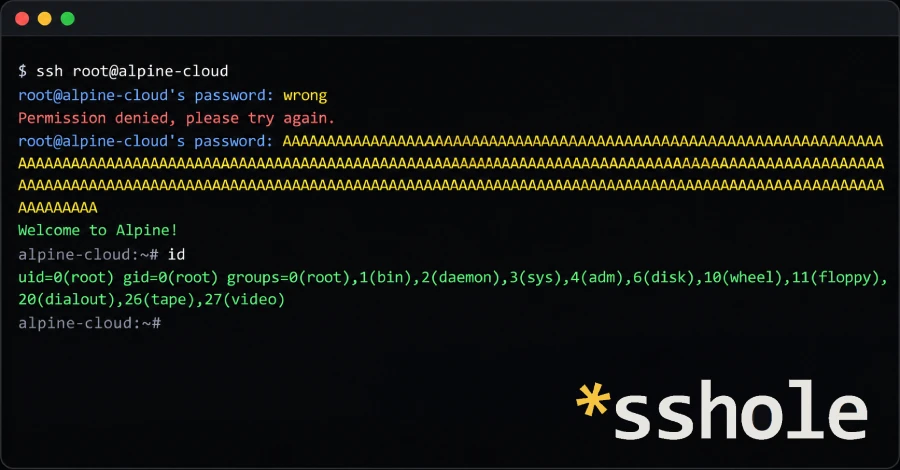
The OpenSSH project released version 10.6p2 on November 5 to fix an authentication bypass that affects Alpine Linux servers. If the server accepts password logins, an attacker who can reach its SSH port can log in as an account that has no password set (a normal setup for key-only accounts) by sending a very long password, between 257 and 1,024 bytes. Alpine’s advisory says the attack takes a single connection and works every time. The attacker needs the name of a password-less account and the machine needs at least one other account with a real password.
The flaw comes from how sshd checks passwords when it is built without PAM (the Pluggable Authentication Module framework), which is how Alpine’s openssh-server package is built. An account with no password stores only * in its password field, which is too short to hold a salt, so sshd borrows the salt from another account’s hash. Alpine’s musl C library signals an error on a password longer than 256 bytes by returning the string *, which is exactly what is stored for every account with no password, so the “hash” matches and the login succeeds. OpenSSH developer Damien Miller said Linux systems built on glibc, non-Linux systems, and systems that verify passwords through PAM are not affected. He told anyone running an affected system to set PasswordAuthentication=no or disable SSH on it immediately. Alpine says no CVE identifier had been assigned when it wrote its advisory, and The Hacker News reports no attacks using the flaw have been seen. BleepingComputer reports that the researcher who found it, Özgün Kültekin of Wakefield, used AI agents that ran about 17,600 authentication tests.
On Alpine’s official cloud images (the tiny-cloud qcow2, VHD and AMI builds from 3.18.11 through 3.24.3), the default alpine user has no password and passwordless doas, so a successful login there leads to root once any $6$ hash exists on the machine, for example after an admin sets a console password.
How to check if you’re affected
Affected products are Alpine Linux servers that run sshd from the openssh-server package, or from openssh-server-pam with UsePAM no. Alpine’s advisory says a server is exposed only when all of these are true:
PasswordAuthenticationisyes, which is the OpenSSH default.- At least one account has
*in its password field. That includesroot(shipped asroot:*since about Alpine 3.16), key-only users, directory-service users, and thealpineuser on tiny-cloud images. Root can only be reached directly ifPermitRootLogin yesis set. - At least one local account has a password hash starting with
$5$or$6$.
Not affected, per the advisory: containers that do not run sshd, systems with PasswordAuthentication no, openssh-server-pam with UsePAM yes, locked accounts (! in /etc/shadow), systems where no account has a $-style hash, and images configured through cloud-init, which writes PasswordAuthentication no.
To fix it, update and then restart the daemon, because upgrading the package does not restart a running sshd: apk upgrade -U -a, then rc-service sshd restart. Alpine point releases 3.21.10, 3.22.8, 3.23.8 and 3.24.4 already include the fixed package, and fixed packages were also published for 3.16 through 3.21, which are past end of support. Cloud instances started from older tiny-cloud images still need the update. If you cannot update yet, Alpine says turning off password logins also closes the hole: confirm your key login works, keep your current session open, set PasswordAuthentication no, check with sshd -t, restart sshd, and confirm sshd -T | grep -i passwordauthentication prints passwordauthentication no.
To look for past abuse, Alpine suggests searching /var/log/messages for sshd lines reading Accepted password for an account that has no password (such as alpine, root or a key-only user), and reviewing doas use, recently created users, files and authorized keys on exposed machines. “If you cannot rule out a login, treat the machine as compromised,” the advisory says.
The researcher’s write-up names other musl-based systems to check, including OpenWrt, Buildroot and Yocto. The Hacker News notes that OpenWrt uses Dropbear for SSH by default and that the researcher says Dropbear is not affected, so on OpenWrt the flaw matters only where an admin installed the OpenSSH server.
Sources
- Alpine Linux — Security advisory: openssh-server password authentication bypass
- OpenSSH release notes (10.6p2)
- OpenSSH commit “avoid password authn bypass” (openssh-commits list)
- The Hacker News — OpenSSH Issues Emergency Fix for Flaw Letting Long Passwords Bypass SSH Auth on Alpine Linux
- BleepingComputer — OpenSSH flaw lets attackers log into password-disabled Linux accounts