
Security firm Socket has found 13 malicious packages on NuGet, the .NET package registry, built to hit Windows developers through a fake take-home job assessment. According to The Hacker News’ summary of Socket’s write-up, most of the packages pose as WinUI 3 and WPF button controls. In the versions Socket analyzed, building or running a project that uses them downloads files from GitHub, sets up a DLL sideloading pair around the Windows On-Screen Keyboard (osk.exe), or downloads and runs an executable. All 13 have been deleted from the NuGet gallery, and the first one was uploaded on July 23, 2026, so the campaign ran for months before it drew attention.
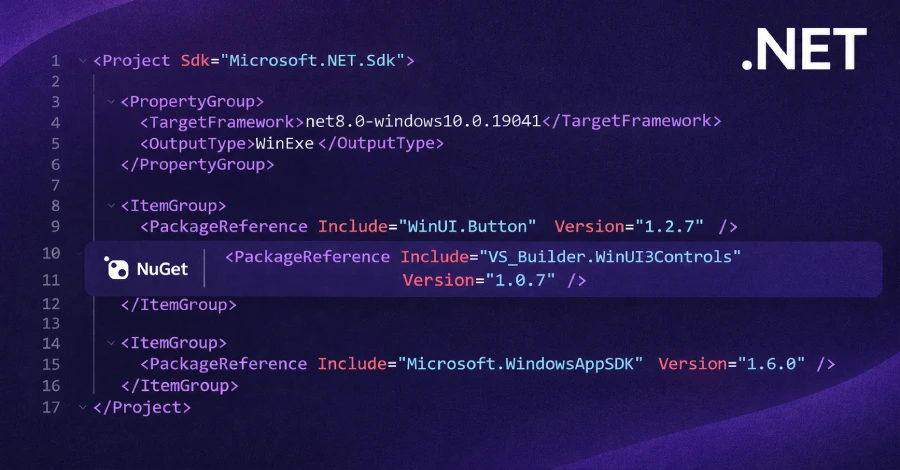
The lure is a GitHub repository, created on November 3, with a WinUI 3 “home assessment” that candidates are told to finish in three to four hours; its project file references two of the malicious packages. THN reports that it is unclear how targets are steered to it. Socket also tied the packages to fake copies of the Axios JavaScript library, to a ClickFix-style page with a fake reCAPTCHA prompt, and to a “Crypto Wallet Analyzer” app released on November 13 that carries a hidden loader. That app was advertised on November 7 in a US$8,500-10,000 listing on the LaborX Web3 freelance marketplace, which THN says was still accessible when it wrote. No named threat actor is blamed: Socket says the tradecraft resembles North Korean and Iranian recruitment lures, but it found no code or indicator shared with a published Contagious Interview campaign.
How to check if you’re affected
Affected products are .NET projects that reference any of the 13 packages THN lists. Affected versions are not fully listed in the sources we read; the lure’s project file references WinUI.Button version 1.2.7 and VS_Builder.WinUI3Controls version 1.0.7. The packages named are:
WinUI.Button,VS_Builder.MSBuildAnalyzer,VS_Builder.WinUI3Controls,HappyOne.MSBuildAnalyzer,HappyOne.WinUI3ControlsWeb3TotalButton,RevertButtonIcon,WinUI3IconButton,WindowsAccentColorName,SetButtonColor,InitializeCustomButton,StyledAppButton,StyledComponent
What to look for, per the details THN reports from Socket:
- Search your
.csprojfiles,packages.lock.jsonand NuGet restore caches for those package names, including as indirect dependencies.WindowsAccentColorName,StyledAppButtonandStyledComponentwere tied to the set through other packages. - On a Windows machine that built or ran such a project, look for
%LOCALAPPDATA%\osk\OskSupport.dllnext to a copy ofosk.exe, and for%TEMP%\Launcher.exe. - THN also lists six npm packages that Socket tied to the campaign, published July 14-23:
axios-test-one,telemetry-metrics,telemetry-axios,axios-native,fs-extra-coreandvitest-axios. Check JavaScript projects for them too. - If you ran a take-home project, a freelance “client deliverable” or a pasted “security token” prompt like the ones described here, the sources do not give cleanup steps. Treating that machine and the credentials, browser profiles and wallet extensions on it as exposed, and asking your security team how to rebuild it, is our suggestion, not Socket’s guidance.
Sources
- Socket research post (the research THN summarizes, linked from THN; the page returned a Cloudflare challenge to our fetch, so facts here are attributed to The Hacker News)
- The Hacker News: 13 Malicious NuGet Packages Turn Fake .NET Job Assessments Into Malware Delivery Traps
- NuGetGallery: RemovedPackages.md (linked from The Hacker News; not read for this post)