
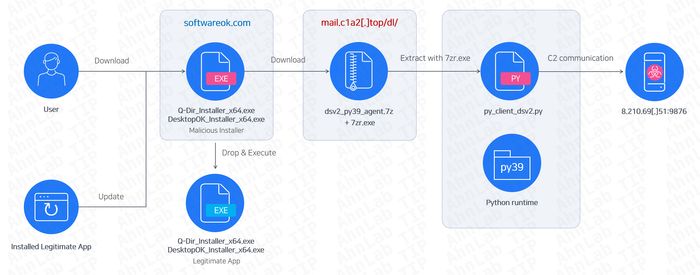
AhnLab’s ASEC research team says some installation files for Q-Dir and DesktopOK, two free Windows utilities distributed from the official SoftwareOK website, were replaced with malicious versions. Q-Dir is a file manager that shows four folder panes at once; DesktopOK saves and restores desktop icon positions. According to AhnLab, the tampered files appeared both when people downloaded the programs from the official download page and during the update process of copies that were already installed, so the official channel itself was the delivery route. AhnLab says the specific cause and path by which the legitimate files were replaced have not been identified, and the activity has not been attributed to a known threat actor. AhnLab says it found Chinese-language comments in the code, which suggests the authors may be associated with a Chinese-speaking environment.
AhnLab says the malicious installer still runs the real Q-Dir or DesktopOK, which carries a valid signature, so the program appears to work normally. At the same time it downloads 7-Zip’s 7zr.exe and an archive from mail.c1a2[.]top, and unpacks a Python-based remote access trojan along with its own Python runtime, so Python does not need to be installed. The RAT can run shell commands and Python code, upload and download files, take screenshots and collect system information. It also checks running processes against a list of 1,206 names of security products (AhnLab names products from AhnLab, CrowdStrike, SentinelOne, Kaspersky, Bitdefender, Malwarebytes and others) and reports what it finds to the attacker’s server, which AhnLab says could help the attacker decide on follow-up attacks or evade detection.
How to check if you’re affected
Affected versions confirmed by AhnLab as replaced with malicious files are Q-Dir 12.85.0.0, 12.84.0.0 and 12.83.0.0, and DesktopOK 12.85.0.0 and 12.82.0.0. AhnLab adds that even if your version is not on that list, anyone who installed or updated either program while the malicious files were being distributed should treat the risk as real. Affected products also include existing installs that updated through the program’s own update feature.
- Compare the SHA-256 of the installer you downloaded with the hash published on SoftwareOK’s download page, and with the legitimate and malicious hashes in AhnLab’s table. AhnLab says some files from the official site did not match the hashes posted on that site.
- Look for the persistence AhnLab documents: a scheduled task named
\UPnp\MicrosoftEdge_dcntel, a folderC:\ProgramData\Microsoft\DeviceSync\b2(orC:\ProgramData\DeviceSync\b2if the first path is unavailable) containing apy39folder, and a scriptpy_client_dsv2.py. - Look for network traffic to
mail.c1a2[.]topor8.210.69[.]51on port 9876, the command server AhnLab lists. - AhnLab’s advice is to uninstall the program and reinstall the latest version it says has been verified as safe, after checking the hash. It also warns that uninstalling and reinstalling may not remove a RAT that is already installed, so check for suspicious Python environments, scheduled tasks, related files and external connections, update your antivirus and run a full scan. If you find signs of infection, AhnLab says to isolate the system from the network and assess whether more malware ran or data left it.
When we loaded SoftwareOK’s home page and its Q-Dir download page (which listed version 12.85), neither mentioned this incident, and we did not verify whether the files it serves today are clean. Check the hash rather than trusting the page.
Sources
- AhnLab ASEC: Software supply chain attack via the official SoftwareOK website, tampering with Q-Dir and DesktopOK installation files
- The Hacker News: Hackers trojanize official Q-Dir and DesktopOK downloads to deliver remote access malware
- SoftwareOK: Q-Dir download page (loaded for the hash comparison; it did not mention the incident)